
Scams involving fake text messages or impersonation of government agencies or banks are becoming increasingly sophisticated.
Traditional security methods often struggle to intervene when victims are psychologically manipulated into voluntarily transferring money or providing personal information.
The Imposter Risk Detection feature in iOS 27 acts as a default layer of protection at the system level.
This layer of protection will alert users and supported third-party applications as soon as it detects any unusual activity, before sensitive information or money is transferred.
Unlike security tools that deeply access personal data, Apple 's new feature operates on an architecture that prioritizes privacy protection.
When users perform sensitive actions on supported apps, such as bank transfers, large payments, or changes to important security settings, the app may request an iOS 27 risk assessment.
The system will analyze interaction time, behavioral patterns, context, and sensor data directly on the device to determine whether the user is being manipulated by a scammer. The assessment process identifies three levels of risk:
Unknown: No unusual data was detected, nor was the user performing actions based on familiar habits.
Medium: Noted some minor abnormal activity.
High: Detects clear signs of tampering or suspected fraud.
Apple asserts that the system does not read or analyze the content in Messages, Mail, or Photos.
The application only receives the final risk score result to trigger preventative measures such as: requesting additional authentication, temporarily suspending transactions, or displaying emergency alerts.
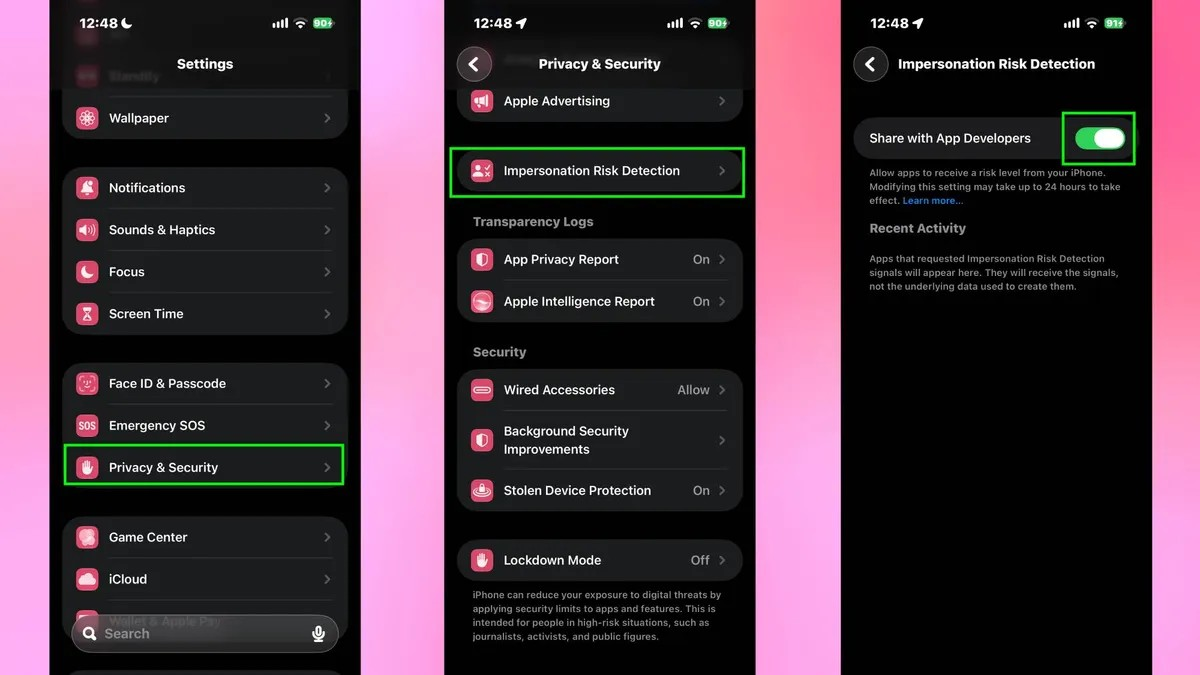
Because the operating mechanism requires sharing a limited number of event signals with app developers and system diagnostic servers, Apple decided to disable this feature by default when users upgrade to iOS 27. Users must manually enable it in the settings.
To enable the feature: Open Settings on your iPhone. Select Privacy & Security. Scroll down to Impersonation Risk Detection and toggle the switch to On.
Apple states that after being enabled, the system may take up to 24 hours to fully activate the protection signals on compatible applications.
After the activity, users can return to this section to check Recent Activity, which helps them understand which applications requested risk assessments and which behaviors triggered alerts.
(According to Tom's Guide)
Source: https://vietnamnet.vn/kich-hoat-ngay-tinh-nang-nay-tren-ios-27-de-khong-chuyen-khoan-cho-ke-lua-dao-2561252.html